
How can I unsubscribe myself from the email notifications or the offer mailers?

Dalim Bhattarai
Updated On 2024-03-18
Unsubscribing from the email notifications or the offer mailers is easy and hassle-free.
To unsubscribe follow the steps outlined below-
- Click on the Unsubscribe button at the end of the email that you receive.
Alternatively,
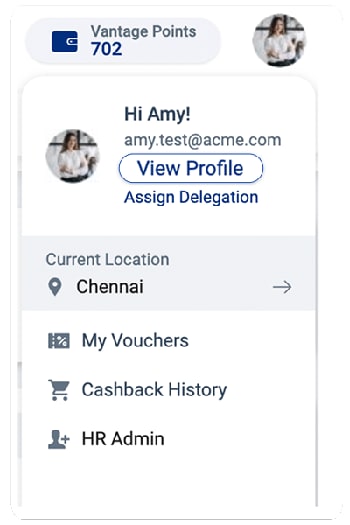
2. Visit the Vantage Perks Homepage, click on the profile icon on the top right corner of the window, and select View profile from the drop-down menu.
3. In the subsequent window, click Edit Profile on the right, scroll down to the bottom of the page, and uncheck the box stating, “Receive occasional mail about special offers (not more than once a week).
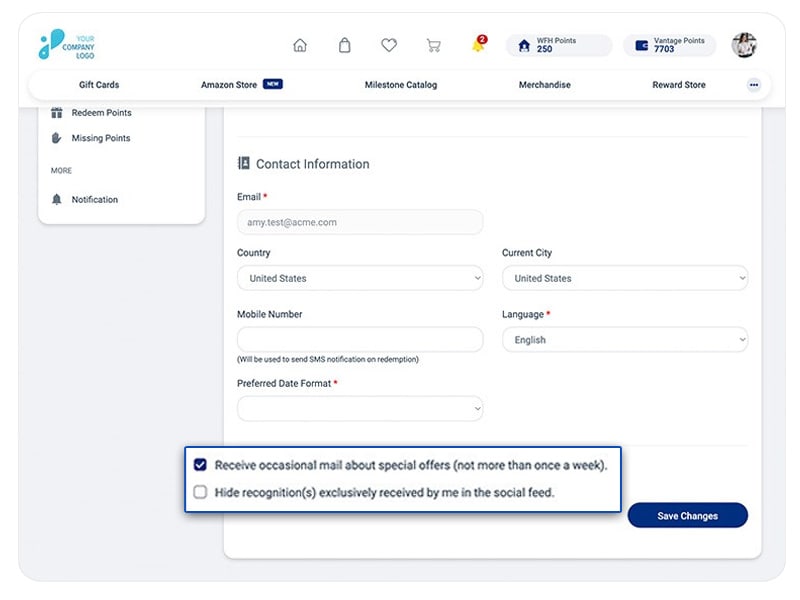
4. In the end, click on Save Changes, and you will be successfully unsubscribed from any email notifications.
Articles in this section