

You can access detailed information about employee engagement in your organization using the dashboard and identify trends and gaps in recognition program implementation.
To access the Admin Dashboard, follow the steps below:
Step 1: Begin by logging into the platform.
Step 2: Click on the Profile Icon located in the top right corner of the window.
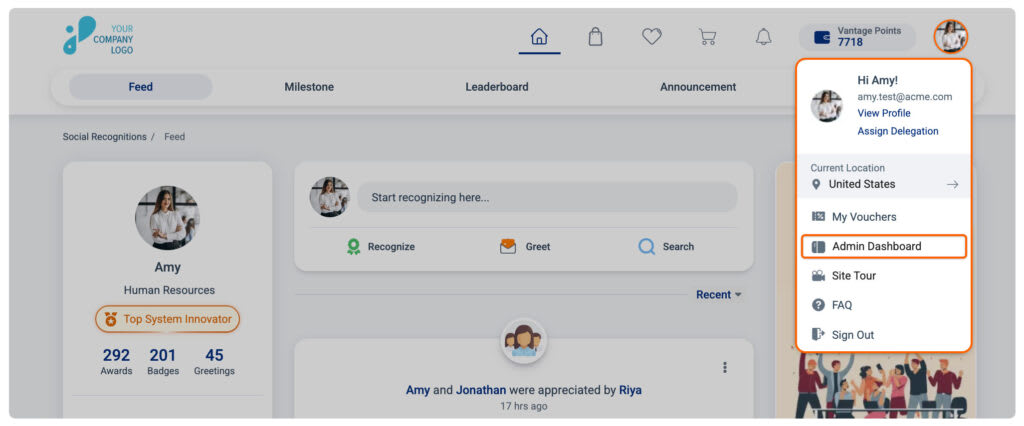
Step 3: Now select Admin Dashboard from the drop-down menu. You’ll be redirected to the Admin Dashboard.
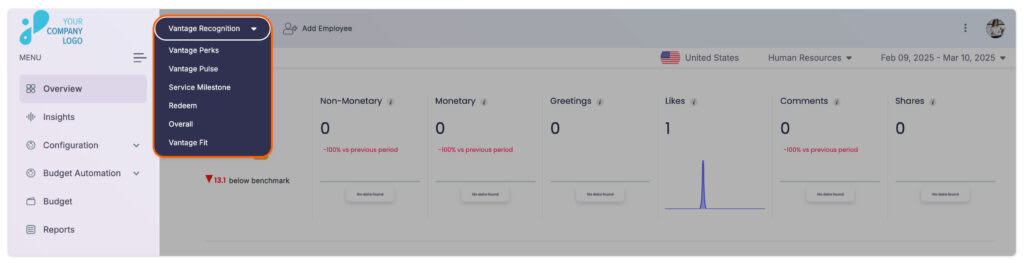
Note: You can access different sections within the Admin Dashboard from the drop-down menu on the header section, including Vantage Recognition Dashboard, Vantage Perks Dashboard, Vantage Pulse Dashboard, Service Milestone Dashboard, Overall Dashboard, and Vantage Points Redemption Dashboard.
Please note: Access to these sections will depend on your subscription plan/package for the platform.