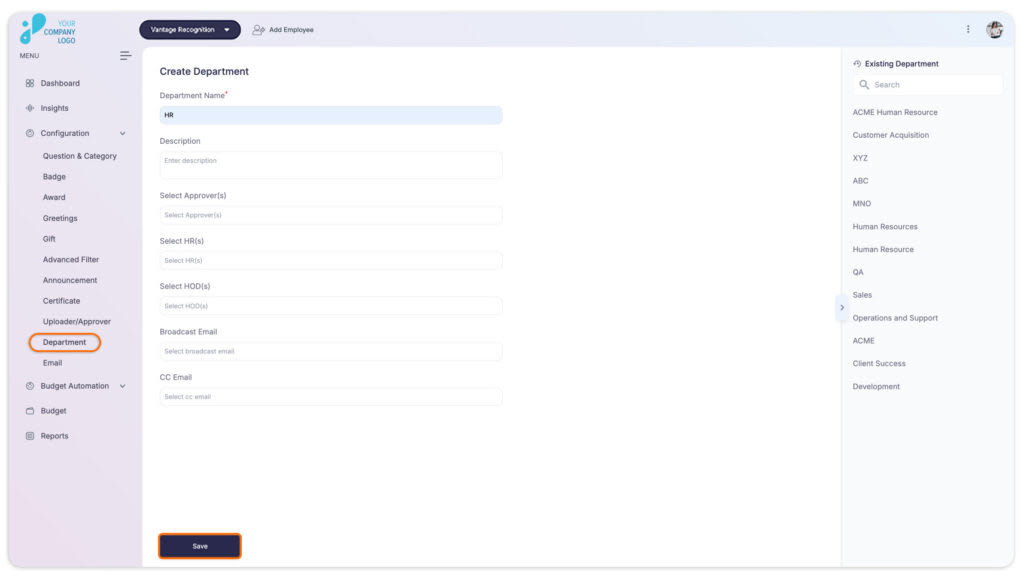
Vantage Recognition allows you to create new departments easily. Follow the steps below :
Step 1: Visit the Admin Dashboard and select Vantage Recognition from the top header section of the window.
Step 2: On the left panel of the window, within the configuration select Department.
Step 3: In the next window, fill in the required details:
-
Department Name: Enter the name of the new department you want to create.
-
Description: Provide a brief description of the department’s function or purpose within the organization.
-
Approver: Select the person who will approve department-related actions or requests.
-
HRs: Designate the HR representatives responsible for the department’s HR-related matters.
-
HOD (Head of Department): Specify the department’s head, who will oversee operations and report on departmental matters.
-
Broadcast Email: Add an email address for broadcasting departmental communications to all members.
-
CC Email: Enter additional email addresses for copying relevant parties on department communications.
Step 4: After filling in all the required details, click the Save button.