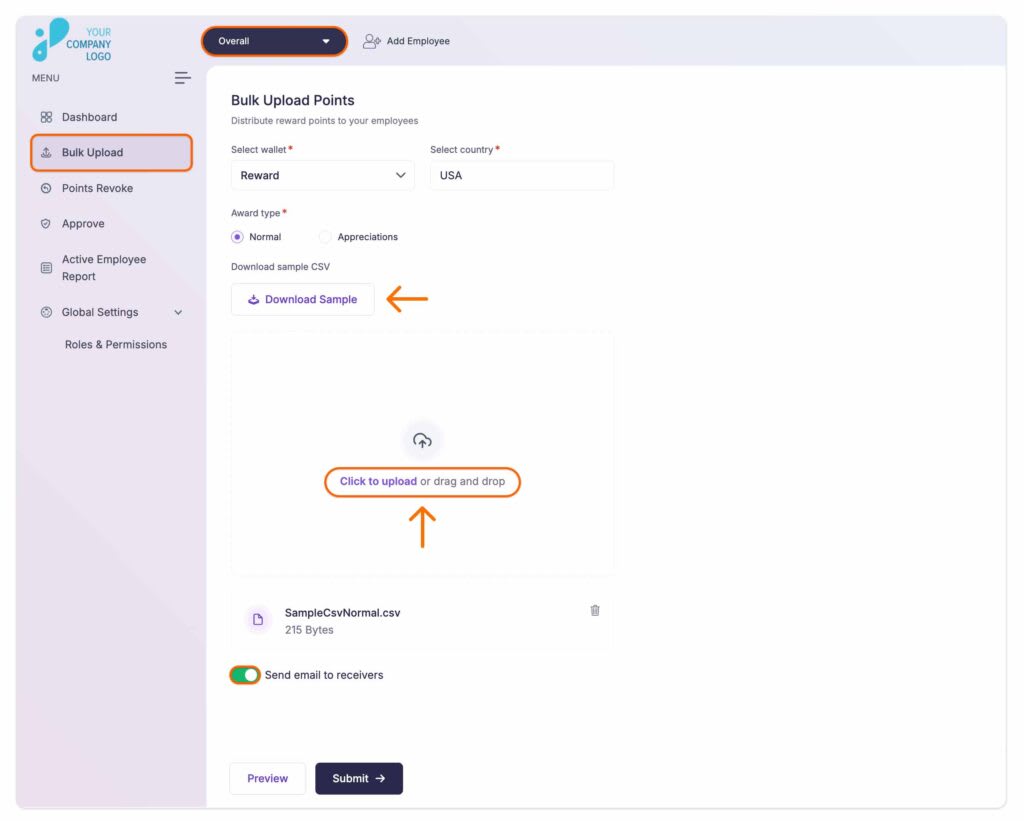
Vantage Circle provides a seamless and efficient solution for rewarding points to numerous employees at once, streamlining the recognition process for organizations. This feature saves time and effort by enabling bulk point allocation, ensuring all deserving employees are recognized simultaneously. It’s an ideal option for celebrating collective achievements, company-wide events, or team-specific milestones, making employee recognition more impactful and inclusive.
Follow these steps:
Step 1: Visit the Admin Dashboard and select ‘Overall’ from the dropdown menu in the header bar.
Step 2: Click on ‘Bulk Upload’ located on the left panel of the window.
Step 3: Select Wallet, where you want the points to get credited.
Note: The Vantage Recognition platform supports multiple wallets, enabling organizations to allocate points for various purposes, such as rewards, fitness programs, work-from-home equipment, and other initiatives.
Step 4: Choose the Award Type and Country.
Step 5: Upload a CSV file in the specified format containing the list of employees.
Step 6: Finally, click on ‘Submit’ and reward your employees.
Note:
- You can download a sample CSV file by clicking the ‘Download’ button.
- Additionally, you have the option to send email notifications to the recipients regarding the reward.
- A designated approver will approve the CSV file and authorize the rewards.