
Review classified ads
Open Perks → Classifieds, open a pending ad and select Approve ad or Decline ad. Employees only see an ad once it's approved, and you can't take it down afterwards.
When an employee posts or edits a classified ad, it waits for an admin’s decision. Go to Perks → Classifieds. The list opens on Pending review, newest first. You can also get here from the Classified ads to review tile on Perks → Overview.
Before you start
- Your company needs Classifieds turned on. Otherwise the page says “Classifieds isn’t turned on for your company”.
- You need to be a super admin, or have the Classified Admin role. Otherwise you won’t see the Classifieds tab, and the page says “You don’t have permission to review classified ads”.
- Admins with the Classified Admin role get an email for each new or edited ad, with the subject “[Classifieds] New ad pending approval” and the ad’s title.
Steps
-
Find the ad. Use the search box for words in the ad’s title, or narrow the list by Category. Under Sort, choose Newest first or Oldest first.
-
Open it. Select the ad’s title, or open the ⋮ menu on its row and choose View ad. In the grid view, the menu appears when you point at a card.
-
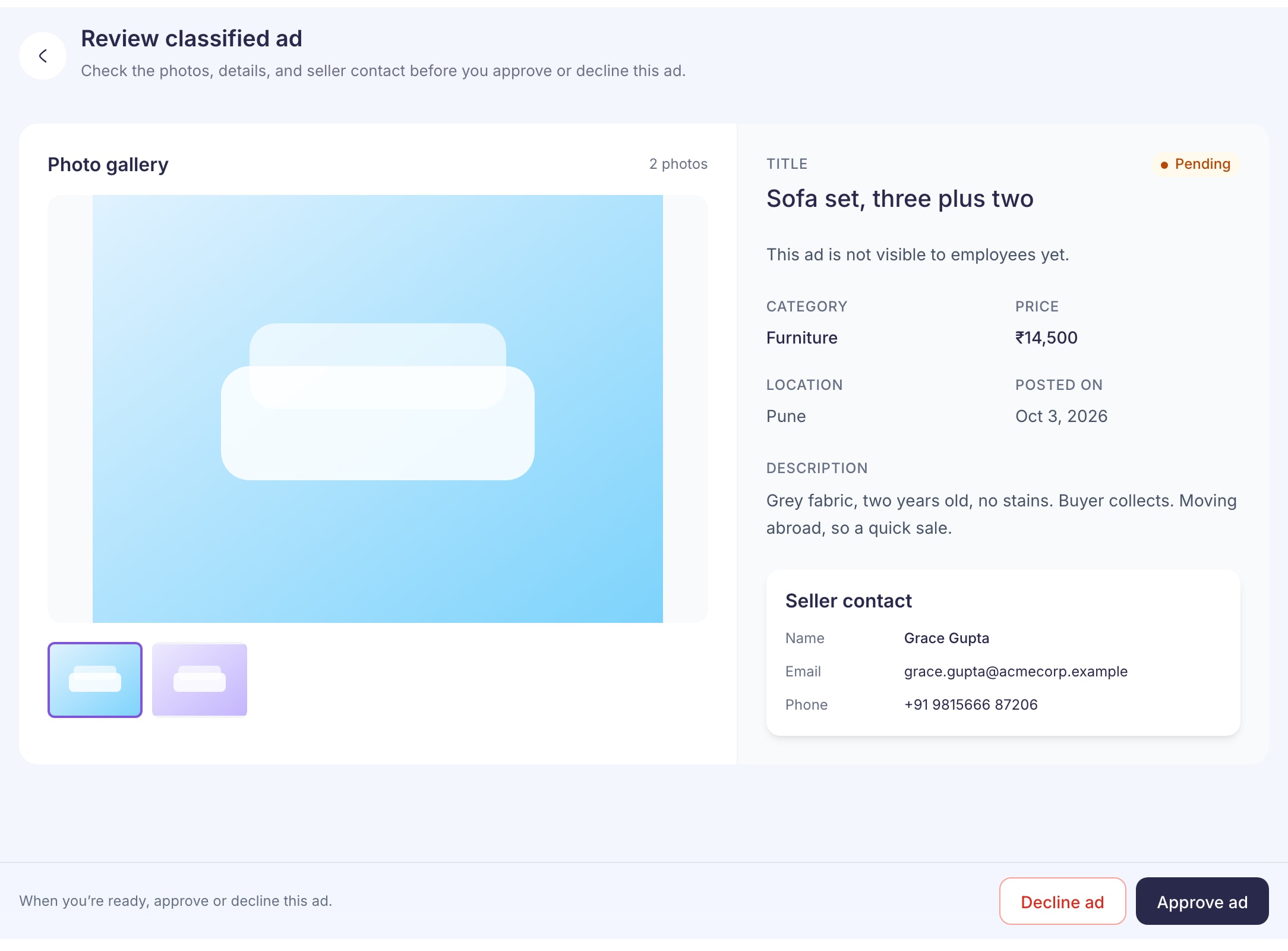
Check the photos, the Category, Price, Location and Description, and the Seller contact box.
-
Select Approve ad or Decline ad at the bottom of the page, then confirm in the box that opens. You can’t close that box while it’s saving.
What happens next
Approve: you’ll see “Ad approved” and go back to the list. Employees can now find the ad in Classifieds. Employees in the seller’s city may get a notification about it.
Decline: the ad is hidden from employees. The confirmation says it will move to Not approved, but today it’s saved as Sold out. That’s why the page then shows “The ad was not updated as expected.” Select View current status and you’ll see Sold out. The ad is still declined, and employees can’t see it.
Declining doesn’t send the seller a message, and there’s nowhere to give a reason. If you want them to change something, use the details in Seller contact. If they edit the ad, it comes back to Pending review.
Looking at past ads
Change Status to Approved or Sold out. Declined ads are listed under Sold out too. Sort only appears for pending ads.
You can’t remove an ad once it’s approved. The page says “Only the seller can remove this ad.” Ask the seller to take it down.
If something goes wrong
“This ad has already been reviewed. Refresh the list and try again.” Another admin got there first. Go back to the list to see its current status.
“We couldn’t confirm the ad’s status.” The request didn’t finish, so you can’t tell whether your decision was saved. Select Check status before you try again.
“Classified ad not found” The ad was removed, or it belongs to another company.