

Vantage Circle

How can we help you?

Find answers, guides, and resources for Vantage Circle products.

How to set up a budget allocation cycle?
Dalim Bhattarai
Dalim Bhattarai
Updated On 2025-04-07

To set up a budget allocation cycle, follow the steps below: 

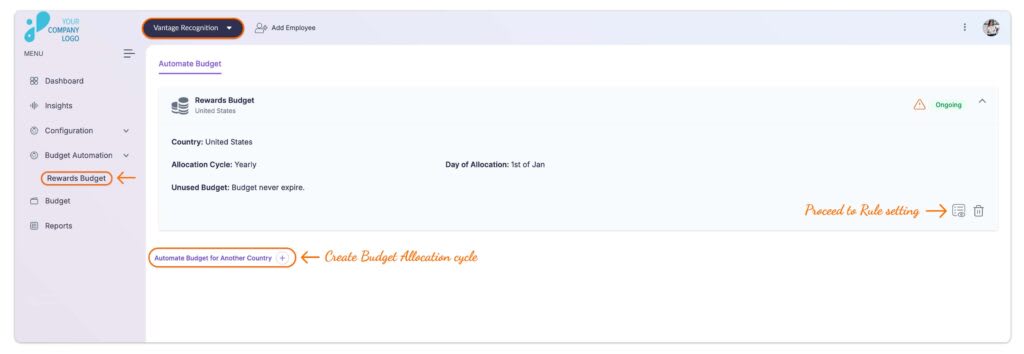
Step 1: Visit the Admin Dashboard and select Vantage Recognition from the top header section of the window. 

Step 2: From the left panel, click on Budget Automation and then select Reward Budget

Step 3: If setting up for the first time, click Get Started, and for consecutive cycles, click Automate Budget for Another Country at the bottom of the window.  
Step 4: Select the Country for which you want to set up the allocation cycle. 

Step 5: Choose the allocation cycle from the predefined options: Yearly, Half-Yearly, Quarterly, or Monthly

  • Select a date from the list of industry-standard allocation dates. 

Optional Step: Set Initial allocation date. The initial allocation date is solely for starting the first cycle and does not override the standard allocation dates for future cycles.  

Click here to learn about the Initial allocation date. 

Step 6: Define the Rules for Managing the Unused Budget: 

  • Select a rule for how unused budgets should be managed at the end of each cycle. 

  • Available options include Complete Rollover, Complete Expiry, Partial Rollover.

Click here to learn more about unused budget management options.

Step 7: Click on the Save and Proceed.

Step 8: Next step involves rules setting for the allocation cycle. 

Click here to learn how to set rules.

Articles in this section
What functionalities are available with Budget Automation? 
What will happen if a manager-level employee joins the company in mid of the allocation cycle? Will they be allocated a budget automatically? 
Can I allocate the budget to individuals? 
Can the budget be revoked? 
How to set up a budget allocation cycle?
What if the user exhausts the allotted budget before the next allocation? 
How do I allocate, deallocate, or bulk allocate the budget to different managerial accounts? 
What is a Rule setting? How is it done?
Is it possible to create two different allocation cycles for the same country?  
Can the start date of an allocation cycle be customized based on organizational needs? 
Is a custom allocation cycle or date allowed? 
 Is it possible to set rules to allocate different amounts of budget to different grade groups? 
Can we change the carryover budget percentage? 
What will happen if an employee leaves the company in between the allocation cycle? What will happen to its budget? 
Is it possible to set the allocation cycle other than predefined ones? 
If an employee switches reporting managers mid-cycle, does their budget allocation get transferred? 
Can reward budgets be adjusted mid-cycle if a team’s size or structure changes? 
Can carry-over policies be customized for different employee grades? 
What happens if the rules are changed just before the allocation? 
What happens when there are overlapping rules? 
What is the Initial Allocation Date? 
What criteria or rules can be configured to manage unused budgets? 
What is Budget Automation, and how does it benefit organizations? 
Still have questions?

You can also write to us at support@vantagecircle.com

Raise a ticket