
Change or extend a campaign
Use Edit campaign or Add badge in the campaign's menu. Before a campaign starts you can change everything; once it's running you can only move the end date, add badges and change the reminder.
Go to Recognition → Campaigns and open the menu (three dots) at the end of the campaign’s row. You can also select the campaign’s name to open its page, which has the same actions as buttons.
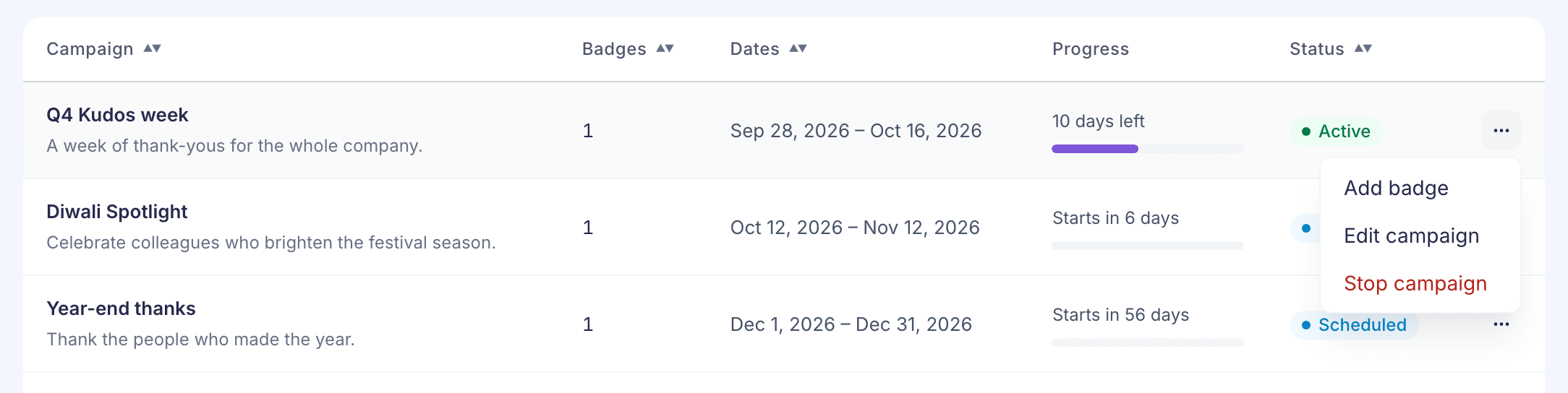
What you can change depends on the campaign’s status:
| Scheduled | Active | |
|---|---|---|
| Name, start date and description | Yes | No |
| End date | Yes | Yes |
| Add badges | Yes | Yes |
| Remove badges | Yes | No |
| Invitation email | Yes | No, it’s already sent |
| Reminder email | Yes | Yes |
Completed and Stopped campaigns can’t be changed. Their menu only offers View report.
Extend or shorten a running campaign
- Select Edit campaign. A running campaign opens on the Badges step.
- Go back to Details. The note says “This campaign is active. You can change only the end date.”
- Change End date. It can’t be before today.
- Select Save changes.
The reminder email goes out the day before the new end date. To end a campaign today, you can also stop it.
Add badges
The quickest way is Add badge in the menu. Choose one or more badges and select Add badges. They’re added straight away.
In Edit campaign, badge changes are only kept when you select Save changes. Leaving without saving keeps the campaign as it was.
Only campaign badges that aren’t in another campaign can be added. To make a new one, use Create badge in the list of badges.
Remove badges
You can only remove badges before the campaign starts. Select the bin icon on the badge, on the Badges step or on the campaign’s page.
A campaign with no badges can’t be used. If it has none on its start date, no invitation email goes out.
Change the emails
Go to the Emails step and pick a different Template, or select Customise to edit one. Once a campaign is running, you’ll see “This campaign is active. Its invitation has already been sent, so you can change only the reminder.”