
Change, complete or delete a plan
Open the plan from Home → Plans. Edit plan changes the owner, due date and status. More has Mark completed, Archive and Delete plan.
Go to Home → Plans and select a plan to open it. Plans still being worked on are listed first. Filter the list by Status, Focus area or Source, or search by title, focus area, scope, evidence or owner. A plan past its due date that’s still Draft or In progress shows Overdue.
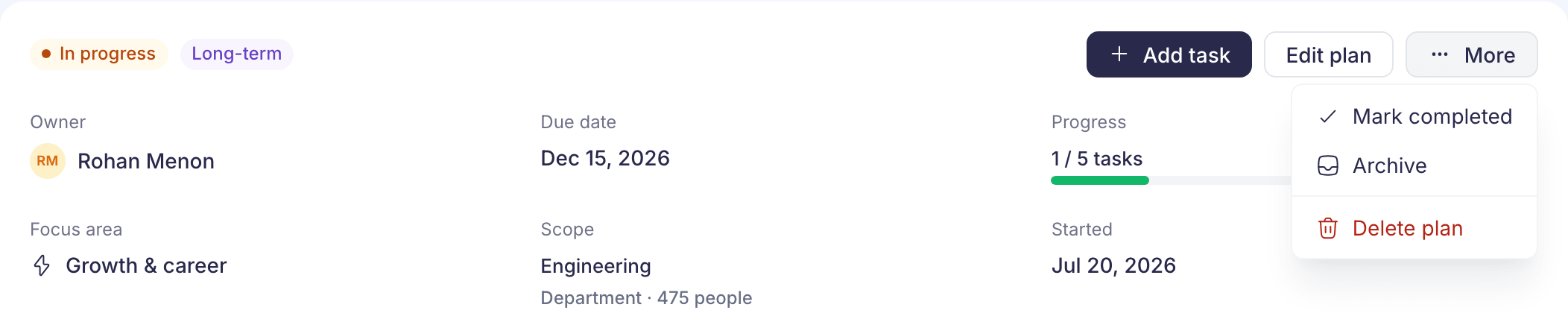
Change the owner, due date or status
- Select Edit plan.
- Change the Owner, Due date or Status: Draft, In progress, Completed or Archived.
- Select Save changes. Choosing Completed or Archived asks you to confirm first.
The title, focus area and scope can’t be changed. If they’re wrong, create a new plan and delete this one.
Complete or archive a plan
Select More, then Mark completed or Archive, and confirm. Mark completed is only offered while a plan is Draft or In progress. Either can be undone by changing the status in Edit plan.
Completed and archived plans move to the end of the list. Add to plan on the Signals page no longer offers them.
Add or remove evidence
- Add signals lists New signals in the plan’s focus area, with signals about the plan’s own scope first. Tick the ones you want and select the button below, such as Add 2 signals. For a signal in another focus area, or one already in another plan, use Add to plan on the Signals page. A plan can hold up to 50 signals.
- Remove signal under a signal takes it off the plan. “The saved evidence will be removed from this plan. Tasks will stay in the plan.” If no other plan uses the signal, it goes back to New.
Each signal on a plan shows Saved evidence: its numbers from the day it was added. Later updates don’t change them.
Delete a plan
Select More → Delete plan. The box says how many tasks will go with it, for example “Hiring in Sales and its 4 tasks will be deleted.” Select Delete plan to confirm. This can’t be undone. The plan’s tasks, steps and comments are deleted, and its signals go back to New unless another plan uses them.
Plans made from a Pulse survey
If your company made action plans from a Pulse survey, they’re in this list too, with Pulse survey as the source and Survey audience as the scope. Their title comes from the survey and can’t be changed. They open in Pulse rather than here.
If something goes wrong
“We couldn’t find this plan” “It may have been deleted, or it belongs to another company.” Select Back to plans.
“No other open signals for this focus area.” There are no New signals left in this focus area. Use Add to plan on the Signals page for others.