
Read the Recognition overview
Recognition → Overview shows how many employees were recognised in the last 90 days or 12 months, what that recognition was made of, and how it compares with the period before.
Go to Recognition → Overview. Every number on the page covers the window picked at the top right: 90 days, the default, or 12 months. The window ends yesterday. The figures are rebuilt overnight, so today’s recognitions show up tomorrow.
Overview always covers the whole company. To narrow it by country, department or recognition type, select Open recognition analytics.
Recognition reach
The first card shows Recognition reach: the share of employees who received at least one recognition in the window. Under the dial you’ll see the count, such as “1,210 employees recognised”, and the base, such as “of 1,840 active employees in the past 90 days”.
- Target under the dial is your company’s reach goal. It’s 70% unless a super admin has changed it in Recognition → Settings, under North star goal.
- The pill beside the title is the change from the window just before, in percentage points. “4.0 pp” up means reach went from 62% to 66%, for example. There’s no pill when there’s no earlier window to compare with.
Quarterly recognition reach shows one bar for each calendar quarter in the past 12 months, against the same target line. The current quarter has a dashed outline, because it’s still running and only counts up to yesterday.
How recognition reach is calculated explains who counts and why the quarters don’t add up to the year.
What the recognition is made of
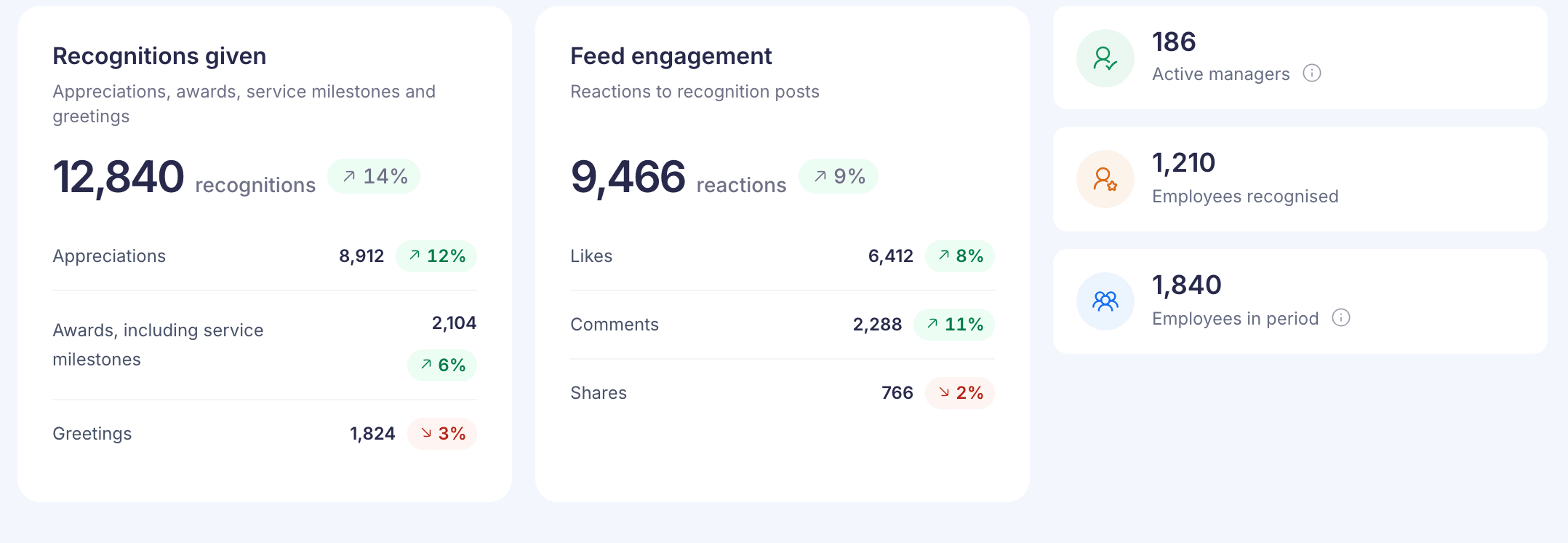
Recognitions given counts every approved recognition in the window. It’s split into Appreciations, Awards, including service milestones and Greetings. Pending and rejected nominations don’t count. An award counts in the window it was approved in, not the one it was nominated in.
Feed engagement counts Likes, Comments and Shares on recognition posts. A reaction counts on the day it happened, even if the post is older.
Each percentage pill compares that figure with the window before. It’s left out when there was nothing in the window before.
The three tiles on the right:
- Active managers: people who manage at least one employee today and gave at least one recognition in the window. Someone who no longer manages anyone isn’t counted, even for an earlier window.
- Employees recognised: the same count as under the dial.
- Employees in period: everyone on the payroll at any point in the window, including people who’ve since left. It’s the base for reach, not the number of people who signed in.
Overview and Analytics count awards differently
On Overview, the awards row includes service milestone awards. Recognition → Analytics shows Awards and Milestones as separate bars, so its awards figure is smaller. Analytics also calls appreciations Badges. The totals still match.
If something doesn’t load
- “We couldn’t load the recognition overview” or “We couldn’t load the reach summary”: part of the page failed and the rest is still shown. Select Try again on the message.
- “Something went wrong”: nothing on the page loaded. Select Try again. If it keeps happening, contact Vantage Circle support.
- “No recognition data is available for this period.”: there are no employee records for the window, so reach can’t be worked out.
- “Recognition reach could not be verified for this period.”: the figure came out above 100%, which means some recognitions don’t match an employee record. Contact Vantage Circle support with the window you picked.
- “Not available for this period.” on a card: part of its breakdown didn’t arrive, so the card shows no total rather than a wrong one.