
Use Recognition analytics
Recognition → Analytics breaks recognition down by type, country, department and date: who is recognised, who gives it, and how it changes over time.
Go to Recognition → Analytics. The four filters at the top apply to the whole page: Recognition type, Country, Department and Date range.
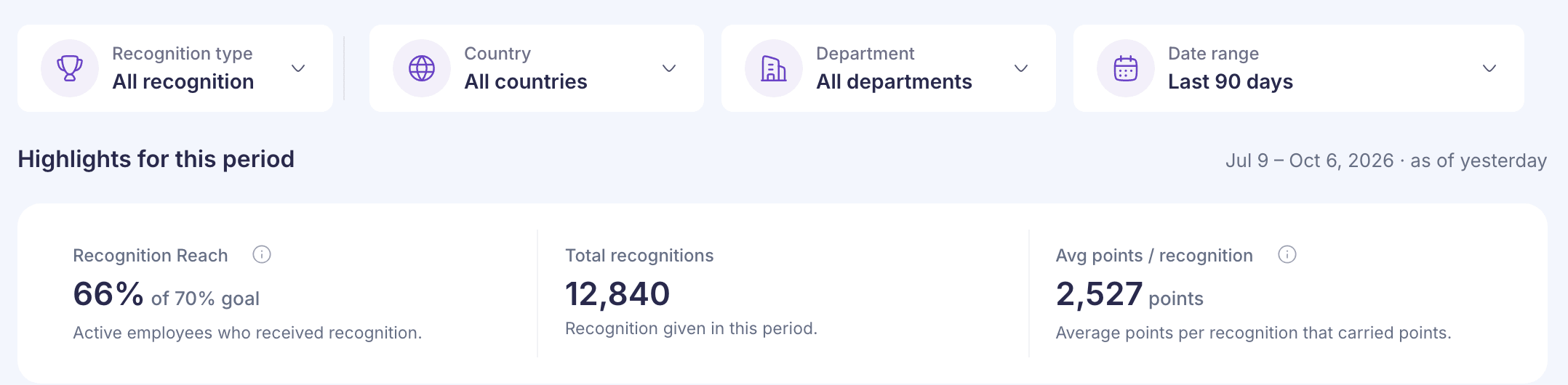
The page opens on Last 90 days. You can also pick Last 365 days, This quarter · so far, Last quarter, This year · so far, Last year, or whole quarters from a grid. Every range stops at yesterday, because the figures are rebuilt overnight. That’s why Highlights for this period says “as of yesterday”.
This page can take a few seconds to answer. While it works, the old figures stay on screen, dimmed, with “Updating…” next to the title.
With no other filters, Last 90 days shows the same reach as 90 days on Overview. For Overview’s 12 months, pick Last 365 days.
Highlights
- Recognition Reach: the share of employees recognised in the range, with your goal beside it, such as “of 70% goal”. A real but very small reach shows as “<1%” rather than 0%. See How recognition reach is calculated.
- Total recognitions: approved recognitions received in the range. With a department picked, it’s what that department’s employees received.
- Avg points / recognition: the average reward points on one recognition that carried points, which means awards and milestone awards. Appreciations and greetings carry no points, so they’re left out.
Reach by quarter, department and country
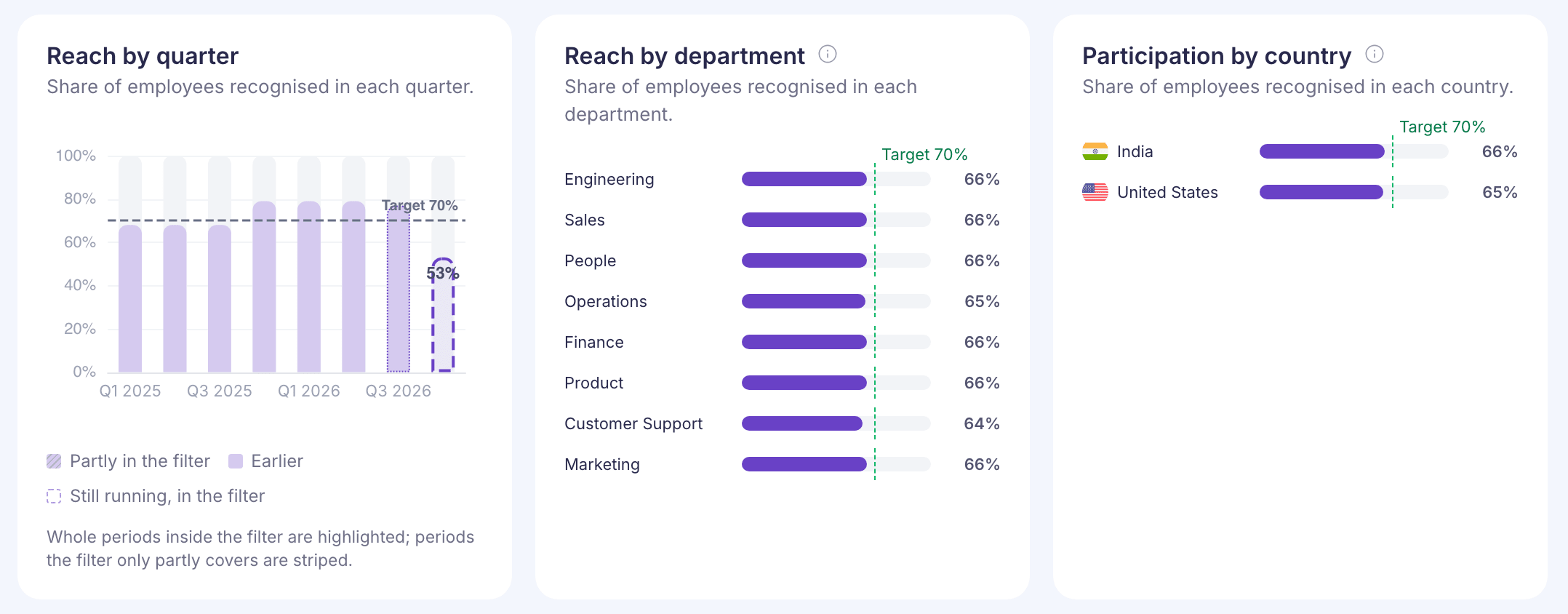
- Reach by quarter: one bar per calendar quarter. Quarters fully inside your range are highlighted, quarters it only partly covers are striped, and the current quarter has a dashed outline.
- Reach by department: the eight departments with the highest reach.
- Participation by country: up to twelve countries, highest reach first. It uses the same reach calculation as the other two.
A small group can hit 100% from one recognition, so check the size of a department before reading much into its bar. Employees with no department or country in their record count in the headline reach but don’t get a bar. The bars don’t average out to the headline either, because each group gets one bar whatever its size.
The other charts
- Recognition over time: Recognitions received and Active recognisers, the people who gave at least one. Switch from Daily to Monthly for ranges of 60 days or more, or Quarterly for 180 days or more.
- Active users: the highest number of active employees on any one day in each month. It only goes back about three months, so a longer range shows fewer points. It isn’t the base used for reach, so the two numbers won’t match.
- Recognitions by department: how many recognitions each department’s employees received. The eight departments with the most are shown.
- Recognition by type: Awards (panel awards included), Badges, Greetings and Milestones. With All recognition picked, the bars add up to Total recognitions.
- Top recognition givers: the five people who gave the most recognition. The card says “Employees who gave the most recognition”, but only people who manage at least one employee are listed.
- Recognition by device: where recognition was given from, such as Web, Android, iOS, Microsoft Teams or an AI assistant. Older recognitions with no device recorded show as Unknown.
- Giving among engaged employees: engaged means they gave, liked or commented on recognition in the range. They’re grouped as Heavy (10 or more given), Medium (4 to 9), Light (1 to 3) and Non-givers.
Filter by recognition type
Under Recognition type, tick one or more of Badges, Awards, Greetings and Milestone awards. With nothing ticked, the page shows All recognition.
Picking a type changes a few things:
- The reach goal is hidden, because it’s set for all types together. The charts say so, for example “Awards only. The 70% goal is for all types, so it is not shown.”
- Avg points / recognition shows a dash for Badges and Greetings, with a note that they carry no points.
- Active users stays the same, because it counts employees, not recognitions.
- With only Milestone awards picked, Top recognition givers and Giving among engaged employees are empty. Milestone awards are given automatically, so there’s no giver.
- With one type picked, the by-type card is renamed, for example to Most-used awards. At the moment it says “Data for Awards is not available for this chart yet.” Pick two or more types to see them side by side.
If something goes wrong
- “Something went wrong” in place of the page: the figures didn’t load. Select Try again. If it keeps happening, contact Vantage Circle support.
- “Reach is hidden for this selection because some values fall outside 0–100%.”: some recognitions don’t match an employee record for that selection. The other charts are still correct. Contact Vantage Circle support with the filters you used.
- “No data is available for this period.” on a card: nothing in your range and filters fed that card.