
Points redemption
Rewards Hub → Points redemption shows, for one country, how much employees redeem each month and through which channels: gift cards, merchandise, partner stores and experiences.
Rewards Hub → Points redemption shows how employees spend the points they receive. For a list of who redeemed what, download the Points Redemption Report instead. See Download Rewards Hub reports.
Filters
- Country: one country at a time. Points are worth different amounts in each country, so there’s no all-countries option.
- Department: narrows every figure to the departments you pick. HR admins can only pick from the departments they’ve been given.
- Date range: starts on Last 90 days. You can also pick Last 30 days, Last 365 days or whole months.
Super admins see the whole company. HR admins see their own departments.
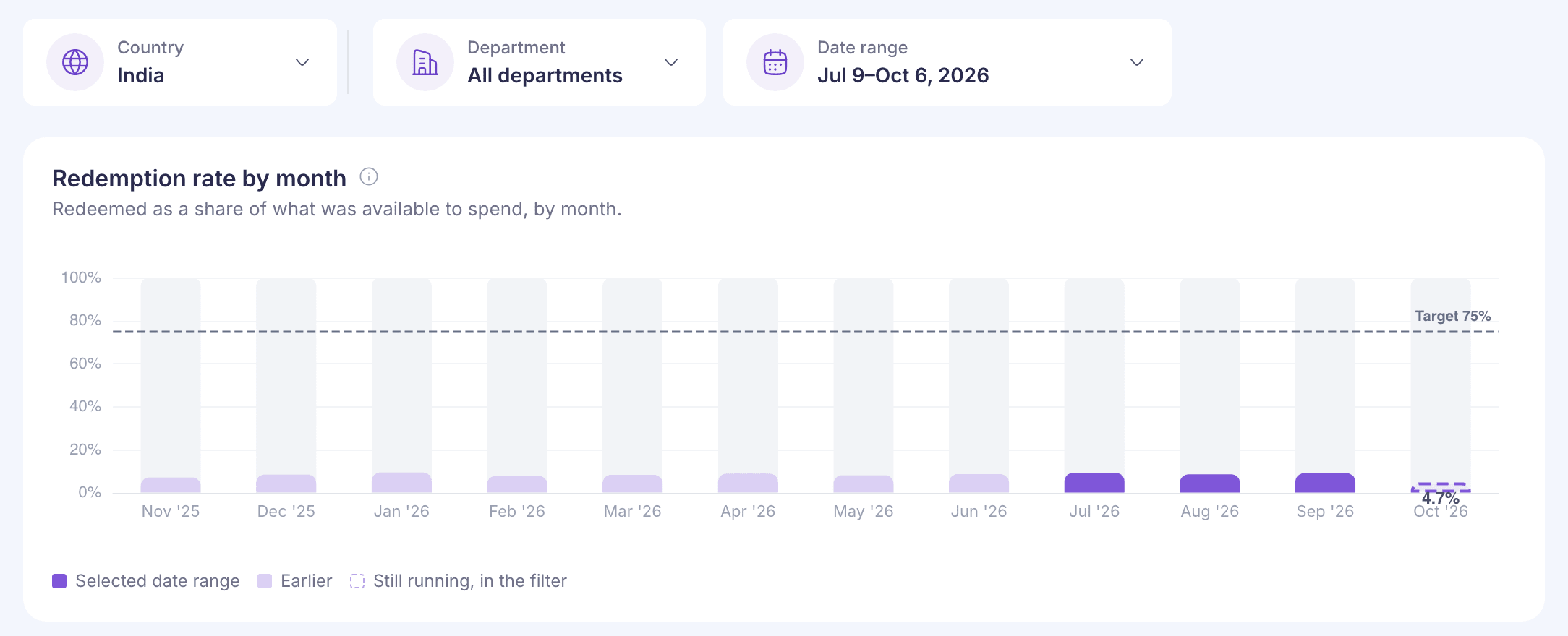
Redemption rate by month
Each bar is the points redeemed that month as a share of everything employees could spend that month: what they already had plus what they received. The full definition is in Rewards Hub overview.
The chart always shows at least the past 12 months. Months inside your date range are highlighted, months it only partly covers are striped, and the current month is outlined.
The 75% target line shows only if your company is billed when employees redeem. Otherwise the subtitle says there’s no target and what your billing is based on.
Points received and redeemed over time
Points received and points redeemed each month. The gap between the two lines isn’t the wallet balance, because employees can redeem points they saved in earlier months.
Channels
The table splits redemptions by channel: Gift cards, Merchandise, Amazon & partner stores and Experiences.
| Column | What it shows |
|---|---|
| Redeemed | The value redeemed through the channel, in the country’s currency |
| Share | The channel’s share of everything redeemed |
| Orders | Number of orders, with the average order value underneath |
| Spread | The difference between list price and cost, where it’s recorded |
Gift cards show “not recorded” under Spread, because their cost isn’t stored per order.
Points redeemed by channel shows the same split month by month. Price and cost difference by channel charts the spread for the channels that have one.
Order fulfillment
The ring counts merchandise and experience orders by status: Successful, Pending, Cancelled, Failed, Refunded and Partially refunded. Gift cards aren’t included, because a gift card is issued, not shipped.
Countries
Super admins see a table of every country at the bottom, as long as no department is picked. Amounts are shown in each country’s own currency.
| Column | Meaning |
|---|---|
| Received | Value of points received in the period |
| Redeemed | Value of points redeemed in the period |
| Available to spend | Balance carried into the period plus points received |
| Redemption rate | Redeemed as a share of available to spend |
| Received less redeemed | Received minus redeemed, leaving out opening balances, refunds and expired points |
| Points last issued | The last month anyone in that country received points |
A person who moved country during the period counts in one country only, so the rates don’t add up across countries.
With a department picked, you’ll see “Country breakdown isn’t available for a department view.” instead.
Common questions
The rate here doesn’t match the overview
The overview starts on 12 months and this page on the last 90 days. Pick the same period on both.
Why is one month so much lower than the whole period?
One month’s redemptions are measured against everything employees had to spend that month, including points saved from before. Over a longer period, more of that balance gets spent, so the rate is higher.