
Rewards Hub overview
Rewards Hub → Overview shows the redemption rate for one country: the share of points employees could spend that they actually redeemed, with the budget and wallet figures behind it.
Rewards Hub → Overview answers one question: are employees spending the points they get? At the top right, choose 30 days, 90 days or 12 months (the default), and a Country.
The page shows one country at a time. A point is worth a different amount in each country, so the Rewards Hub never adds countries together. It starts on your own country, or else the country with the most points in its company wallet.
Super admins see the whole company. HR admins see the departments they’ve been given. Other admins see “Redemption could not be loaded.”
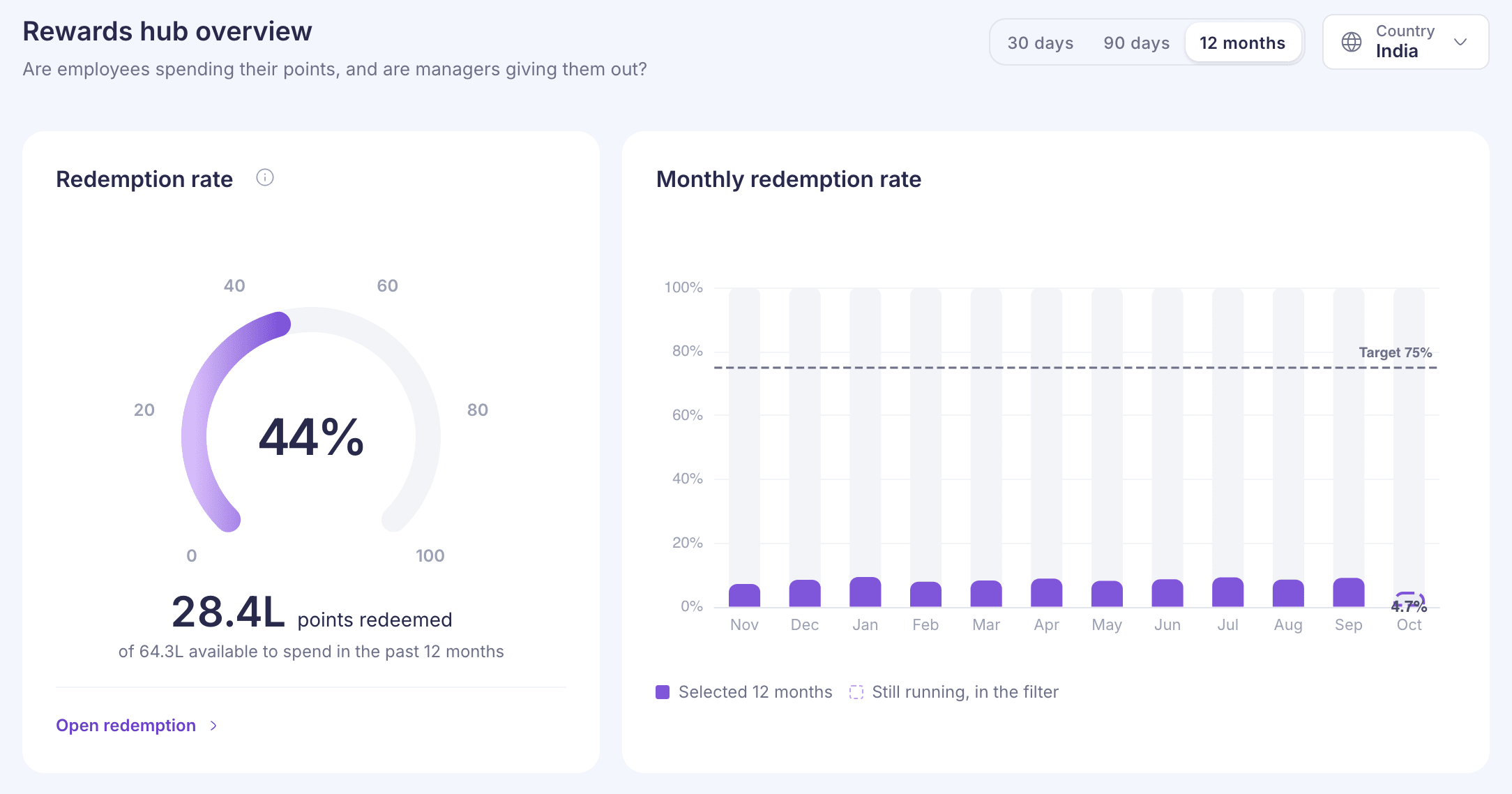
Redemption rate
The redemption rate is the share of points employees could spend that they actually redeemed in the period.
“Could spend” means the points they already had at the start of the period plus the points they received during it. Employees spend from their whole balance, not just from this period’s points, so both count.
Say Acme Corp’s employees in India start the period with 40,000 points, receive 60,000 and redeem 45,000. The redemption rate is 45,000 ÷ 100,000, which is 45%.
- The line under the dial shows the two numbers, for example “of 64.3L available to spend in the past 12 months”.
- If it says “based on points received only”, the starting balances couldn’t be read. The rate then divides by points received alone, so it reads higher than usual.
- “Nothing was available to spend in this period.” means there were no points to spend, so there’s no rate.
The figures cover the main rewards wallet only.
Monthly redemption rate
The bars always show the past 12 months. The period you choose is highlighted, and the current month is marked as still running. The dashed line is the 75% target.
A single month reads lower than the rate for the whole period. Each month’s redemptions are measured against everything employees could spend that month, including what they saved from earlier months.
What drives redemption
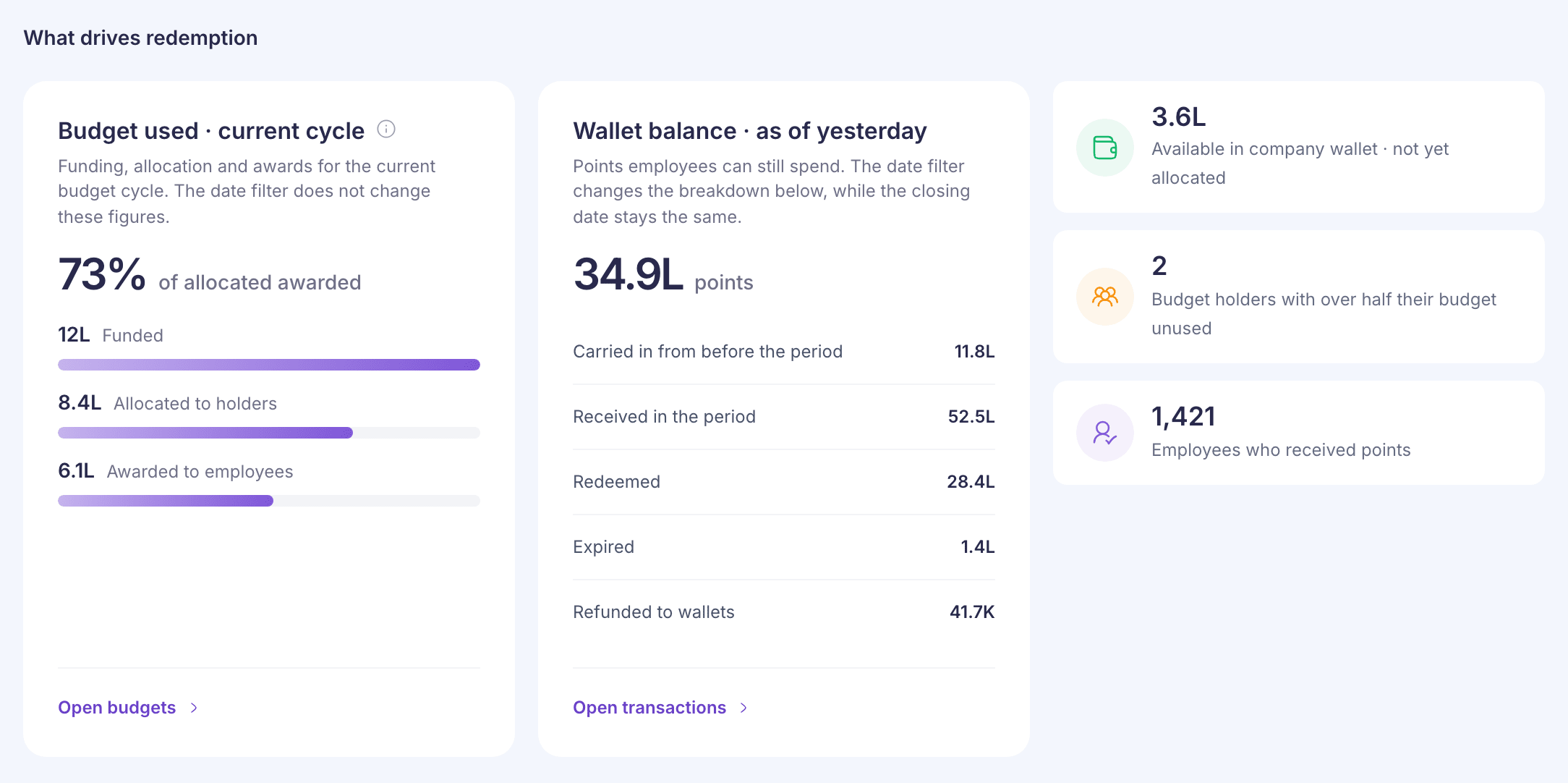
The first card depends on whether your company uses budgets.
Budget used · current cycle shows if your company uses budgets. The headline is the share of budget allocated to budget holders that they’ve already awarded to employees. The bars show:
- Funded: points loaded into the company wallet for this cycle.
- Allocated to holders: points handed from the wallet to budget holders.
- Awarded to employees: points the holders gave out.
This card always covers the current budget cycle. The 30 days, 90 days and 12 months choice doesn’t change it. It can go over 100% when holders award budget carried in from an earlier cycle. See Budgets.
Points awarded to employees shows instead if your company doesn’t use budgets. It’s the points that landed in employees’ wallets in the period, with Employees who received points and Average per employee.
Wallet balance · as of yesterday is the points employees can still spend. The breakdown underneath follows the period you chose, but the balance itself is always as of yesterday:
- Carried in from before the period
- Received in the period
- Redeemed
- Expired: see How reward points work.
- Refunded to wallets: points returned when an order was cancelled or refunded.
- Other balance adjustments: anything else that moved balances. It only shows when it’s large enough to change the total.
The balance includes points held by people who have since left your company.
Tiles
With budgets, the three tiles are:
- Available in company wallet · not yet allocated
- Budget holders with over half their budget unused
- Employees who received points in the period
Without budgets, they are:
- Top redemption channel, for example “Redeemed as Gift cards · top channel”, with its share of points redeemed.
- Redemption orders placed in the period
- Points expired in the period
Common questions
Why does Points redemption show a different rate?
Points redemption starts on the last 90 days, and the overview on 12 months. Choose the same period on both to compare. See Points redemption.
Why can’t I see all countries together?
Points in different countries are worth different amounts, so a combined total would be wrong. Look at each country in turn.
A card says it couldn’t be read
Each card loads on its own. If one fails, the rest still show. Reload the page to try again.