
How do I select the winner for a Panel Award?

Dalim Bhattarai
Updated On 2025-03-25
If you are assigned the role of a Winner Selector for Panel Awards, follow these steps to select the winner
Step 1: Visit the Vantage Recognition Homepage by logging in.
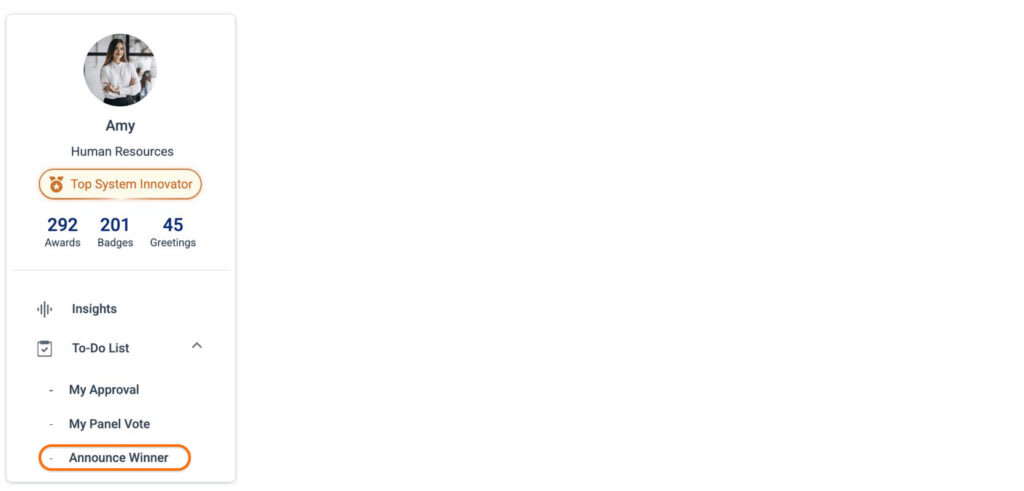
Step 2: On the left side, below the profile image, click on the To-Do List section and finally select the “Announce Winner” option.
Note: The Announce option is available only if you have the role of the designated winner selector.
Step 3: Under Pending Announcements, view the nomination details and choose the winner for a specific award by clicking the Announce Winner button.
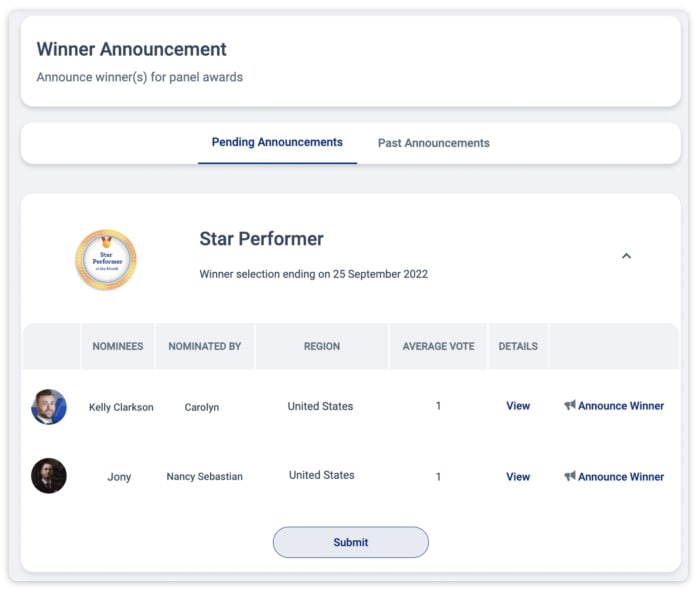
Note- You can add additional remarks before announcing the winner
Articles in this section
Most Viewed Articles for Vantage Recognition
What core objectives can be achieved with Intelligent Recognition? How does Intelligent Recognition enhance authentic expression in recognition? How does Intelligent Recognition foster a strong culture of appreciation? How does Intelligent Recognition streamline and simplify the recognition process?