
Set up Boost
Go to Recognition → Boost, choose up to three amounts and the countries, set how many Boosts each person can give in a period, choose who pays, then select Create configuration. One setup applies to the whole company.
Boost lets people add bonus points on top of an award someone has already received. One Boost setup applies to the whole company. Only super admins can open Recognition → Boost. If your company doesn’t have Boost, the page says “Boost is not activated” and asks you to contact your account manager.
Create the setup
-
Go to Recognition → Boost.
-
Under Availability and value, choose up to three Boost denomination(s). Each is worth a different amount in each country. If the list is empty, contact Vantage Circle to have point amounts added.
-
Choose the Countries where Boost is valid, or select Select all countries. Boost only works for people in these countries.
-
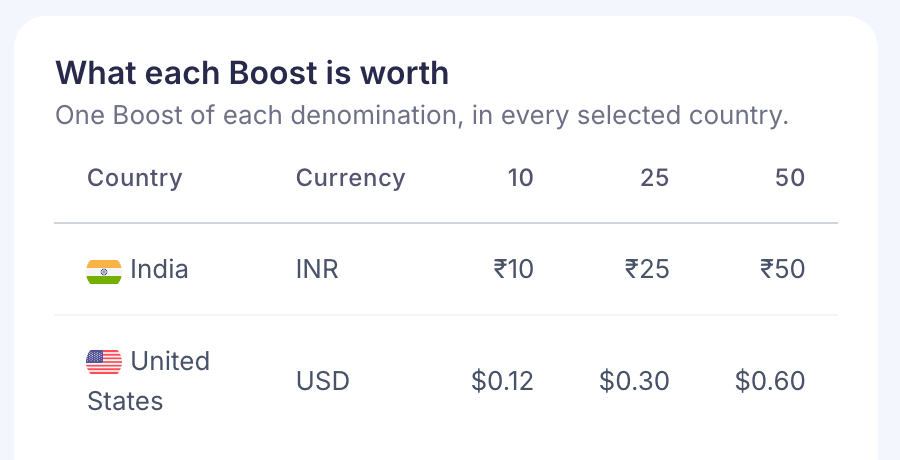
Check What each Boost is worth on the right. It shows one Boost of each amount in every country you chose, in that country’s currency.
-
Under Limits and period, choose the Period (Monthly, Quarterly, Half Yearly or Yearly) and when it starts under Period starts. The page shows the dates of the current period.
-
Enter Total Boosts per giver, the most one person can give in a period, and Boosts per recipient from the same giver. Both must be more than zero.
-
If your company uses budgets, choose a Budget source:
- Each giver’s Boost Holder wallet: points come from the wallet of the person giving the Boost.
- One central budget holder: every Boost is charged to one person you choose. They need funded wallets in each country you selected.
-
Select Create configuration. Boost is on straight away.
If something is missing, an error names the first thing to fix, such as “Pick at least one country where Boost is valid.”
Change it or turn it off
After you’ve saved, the page shows a summary. Select Edit configuration to change it, then Save changes.
Select Turn Boost off and confirm to stop everyone giving Boosts. Boosts already given aren’t affected, and your setup is kept. Select Turn Boost on to start again with the same settings.
Good to know
- Who can give Boosts. Only people with the Boost role see Boost on award posts. What they see is described in Lead your team.
- Limits reset with the period. When someone reaches their total, they see “Your monthly boost limit is exhausted.” The word changes with your period. If they’ve boosted one person too often, a message says so.
- Changing the period starts a new, shorter first period on the day you change it. The summary says so under Current period.
- If a saved country or amount is no longer offered, a warning at the top tells you. Saving removes it from Boost.
- Budget. With budgets, a Boost fails with “Insufficient budget.” if the paying wallet doesn’t have enough points in the receiver’s country.