
Compare groups on the heatmap
Pulse → Heatmap shows each question topic's score for each group of employees, such as departments or countries, so you can see where scores are low. Small groups are hidden to protect anonymity.
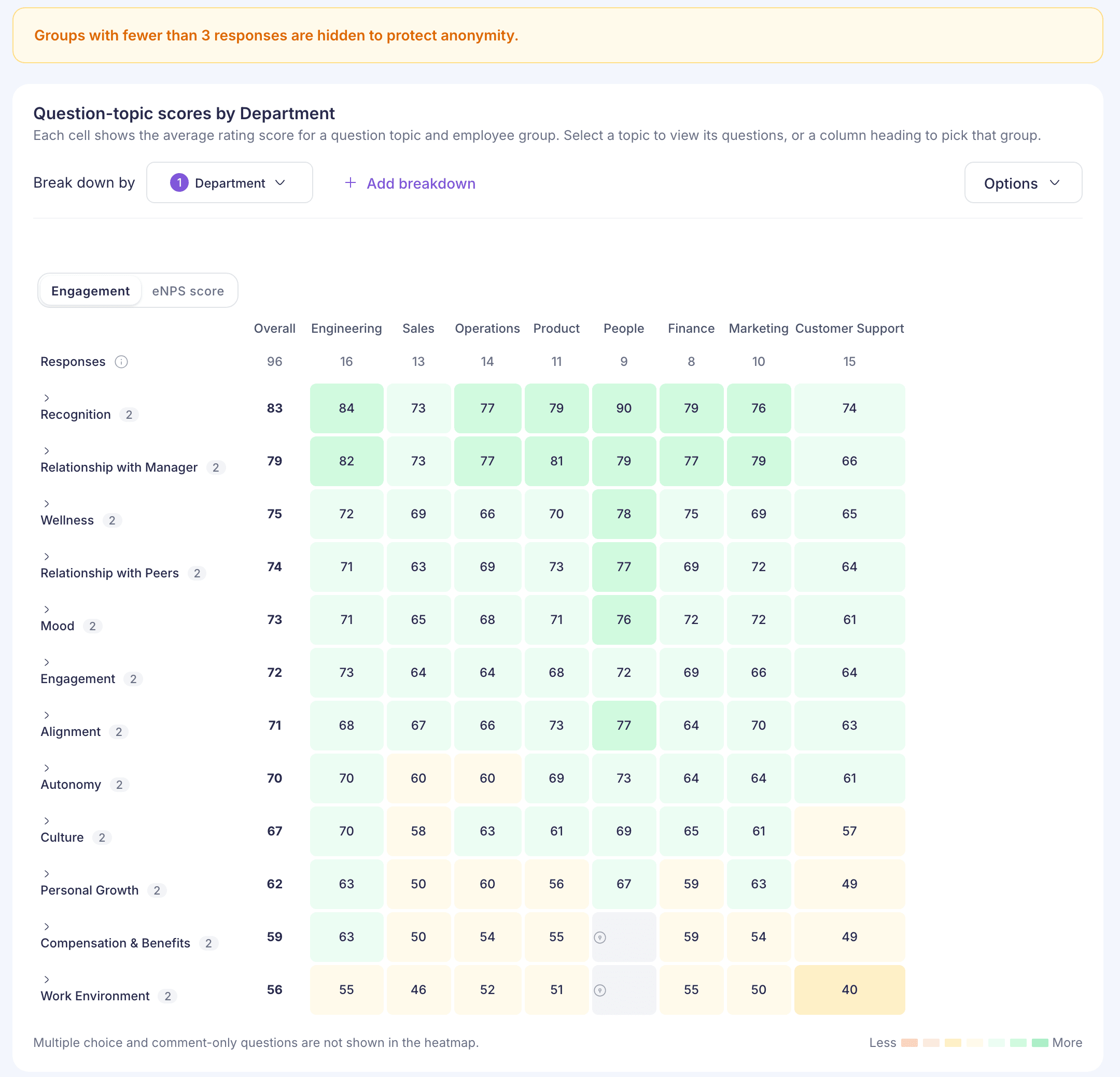
Go to Pulse → Heatmap and pick a survey at the top. Each row is a question topic and each column is a group of employees. A cell is that group’s average rating score for that topic, and its colour runs from red for low scores to green for high ones.
Steps
- Under Break down by, choose how to group people. The list shows the employee details your company has, such as Department, Country, Location or Tenure.
- To split further, select Add breakdown. You can use up to 3. Columns then cross the groups, such as each department in each country.
- Choose Engagement or eNPS score above the grid.
- Select a topic to see its questions. This works with one breakdown and one survey.
- Select a column heading to narrow the grid to that group.
To see change, pick a second survey under Compare with. Each cell then shows the score and its change, with the biggest drops first. Only topics asked in both surveys are shown.
Multiple-choice and comment-only questions aren’t shown on the heatmap.
Small groups are hidden
A group’s scores show only when more than 3 people in it answered a rating question. Smaller groups keep their column heading, but their cells are locked. The banner says “Groups with fewer than 3 responses are hidden”, but a group of exactly 3 is hidden too.
You can raise the limit under Options → Response threshold, from 3 up to 25. You can’t lower it below 3.
Options
- Response threshold sets the smallest group that shows scores.
- Hide columns with no responses and Hide columns with no visible score tidy up wide grids.
- Saved views keeps your breakdowns and settings under a name. Saved views are kept in your browser only. They don’t follow you to another computer, and other admins can’t see them.
Wide grids
Up to 24 columns read well. Past that, you’ll see “This heatmap may be difficult to read”, and you can choose which columns to show. The grid draws at most 300 columns. If a breakdown makes too many groups, you’ll see “Too much data to display”. Remove a breakdown or pick fewer values.
After you find a low score
Open Pulse → Comments and filter by that Department or Category to read what people said. See Read and tag comments. To track what you do about it, see Action planning.
If something goes wrong
“Analytics is not available for your role” Reporting managers can’t open the heatmap yet. See “Analytics is not available for your role”.
“No results for this selection” Nothing matches what you picked. Choose another survey or fewer breakdowns.