
Use Pulse Analytics
Pulse → Analytics shows how scores move over time or tenure, how departments compare, and the score, participation and eNPS for every question category, with the questions behind each one.
Go to Pulse → Analytics and choose what to look at with the boxes at the top: Survey type, then Survey. Pick one survey to compare it with another of the same type under Compare with.
The trend chart
The first card shows four numbers: Engagement score, eNPS, Participation rate and Total comments. Select one to draw it on the chart below.
- For Pulse surveys, the chart runs over time. A dashed line marks your goal, and gaps between surveys are marked No survey running.
- When you pick all onboarding or all work anniversary surveys, the chart runs by tenure instead of by date. On the engagement chart, each dot’s colour shows attrition risk: Low, Medium, High or Critical.
Attrition risk goes up with the number of detractors and passives in a group, not their share. A large group can show a higher risk than a small one with the same answers.
Departments
Three charts compare departments:
- Engagement by department, with a line at 80 for the Great range.
- Participation by department, with a line at the 70% target.
- eNPS by department. Below zero means more detractors than promoters.
Category scores
The table lists every question category with its Score, its range name, Participation and eNPS · split. Sort it with Lowest score first, Highest score first or Lowest participation first. When you compare surveys, a Δ vs compare column and a Biggest drop vs compare sort appear.
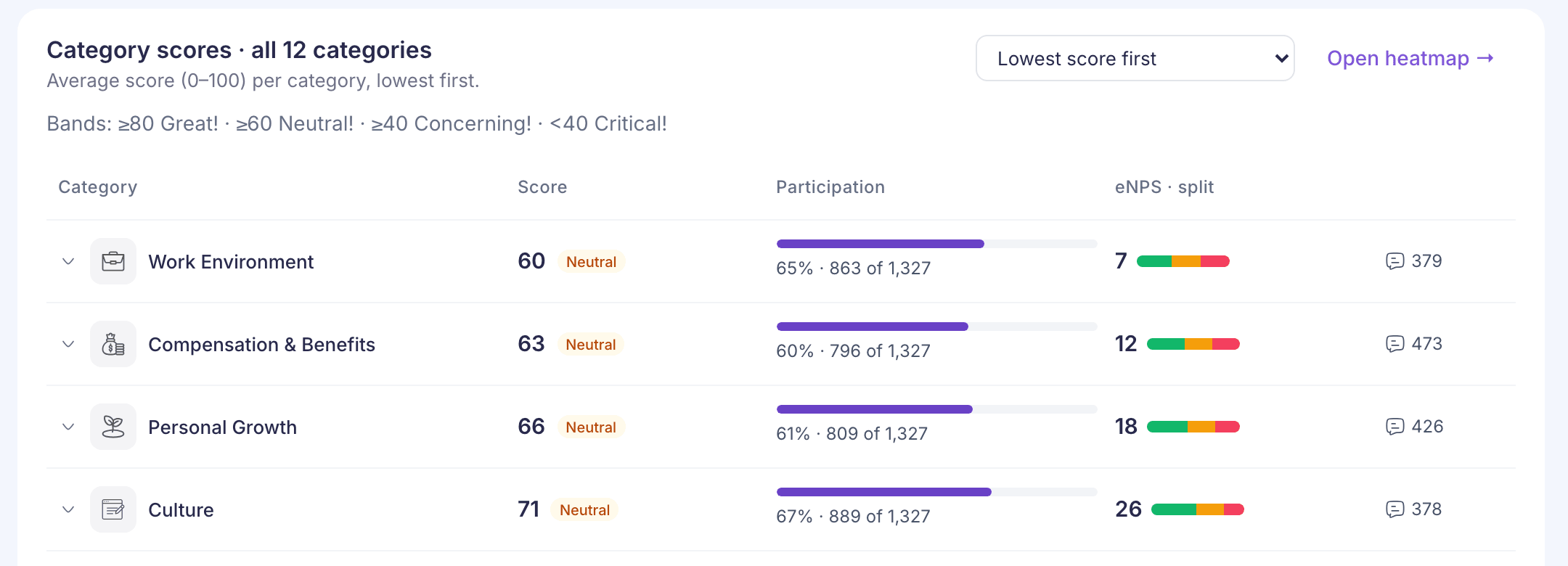
Select a category to open its questions:
- Rating questions show their own scores. These build the category’s score.
- Multiple-choice questions show how answers split across the options. They don’t count towards the score.
- Written questions show a few of the comments. Select Comments in this category to read them all in Comments.
Open heatmap takes you to the same categories split by group. See Compare groups on the heatmap.
Score ranges
| Score | Shown as |
|---|---|
| 80 or more | Great |
| 60 to 79 | Neutral |
| 40 to 59 | Concerning |
| Below 40 | Critical |
If something goes wrong
“Analytics is not available for your role” Reporting managers can’t open Analytics yet. See “Analytics is not available for your role”.
“Some results could not be loaded” Part of the page failed. The cards that did load are correct. Reload the page to try the rest again.
“The score for this survey is outside 0–100, so it is not shown. Contact support.” Some stored answers are out of range. Contact support with the survey’s name.