
Set up questions and categories
In Recognition → Questions & categories, choose for awards and for badges whether employees see everything, pick a category first or answer a question first. The choice is fixed once you save the first category or question.
Questions and categories help employees find the right award or badge when they recognise someone. You set them up separately for Awards and for Badges in Recognition → Questions & categories. For each, choose one of:
- Show all available awards (or badges): employees go straight to every one available to them. This is where every company starts.
- Choose a category: employees pick a category, such as Teamwork, then see the matching ones.
- Ask a question: employees answer one or two questions, then see the ones linked to their answers.
Decide carefully. Once you save the first category or question, the choice says Cannot be changed once saved.
Turn on categories or questions
- Go to Recognition → Questions & categories.
- In the Awards or Badges panel, choose Choose a category or Ask a question. Nothing changes for employees yet.
- Create the first entry, which turns the choice on:
- For a category: enter a Category name (up to 45 characters) and an Employee description. Employees see the description beside the name. Select Create category.
- For a question: enter the Question (up to 200 characters) and at least two Answers. Use Add answer for more. Select Create question.
- Add more with Add category or Add question.
Link awards and badges
You don’t link them on this page. When you create or edit an award or badge, you’ll see Choose the category that includes this badge or Choose which answers lead to this award. Pick at least one. See Create a standard award and Create a badge.
Each answer or category on this page shows the awards or badges that use it.
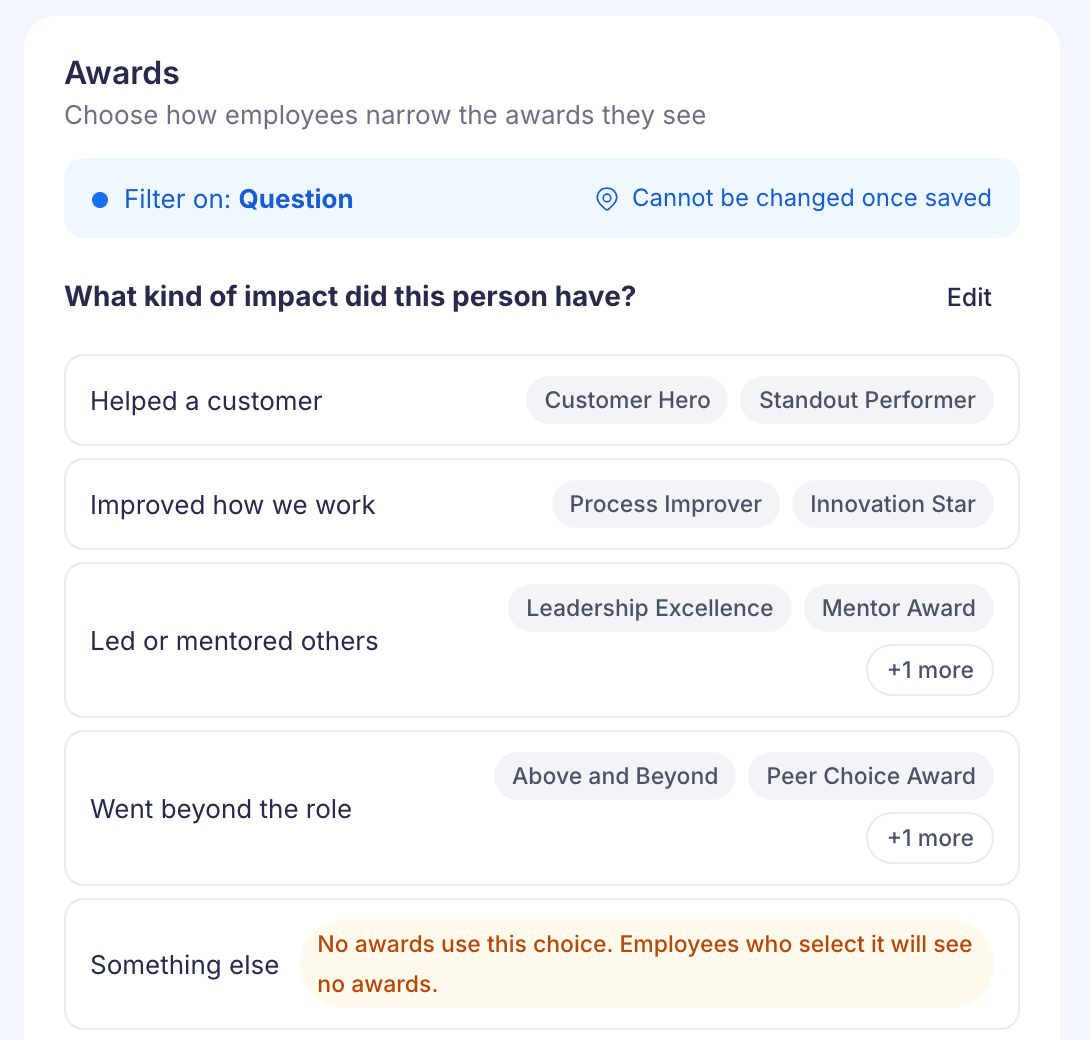
If an answer or category says “No awards use this choice. Employees who select it will see no awards.”, link at least one award to it. Otherwise employees who pick it have nothing to choose.
Change what you’ve added
Select Edit next to a question or category to change its wording, add answers, then Save changes. You can’t delete a question, category or existing answer here, because awards or badges may already use it.
If something looks wrong
“Your saved choices do not match this setting”. The saved list was made for the other option. Employees may not see the right choices, and you can’t add more until Vantage Circle Support fixes it.
“Employees will also see a choice saved from an earlier setup”. Entries from an earlier setup will show next to new ones when you turn the choice on. They can’t be removed here.