Walk into almost any office today and the technology is doing half the coordinating. Chat threads have mostly replaced the hallway check-in, and a dashboard now does the job the Monday status meeting used to. Even who's in the building on Thursday gets decided by a booking app.
Most of that has made work faster. Some of it has made work noisier, and the research on both effects is a lot clearer now than it was a few years ago.
One piece usually goes missing when people list what workplace technology covers. It's the software built around recognition and employee feedback, the tools that decide whether people feel their work gets noticed at all. That category is just as measurable as the rest. For most HR teams, it also sits closest to the problems they get asked to fix.
What Counts as Workplace Technology?
Workplace technology is the set of tools, software, and systems an organization uses to run daily work, from collaboration platforms and automation to data analytics and employee-experience tools.
It boosts productivity and makes hybrid work possible. Most lists stop at four categories, though. A fifth, technology built around recognition and engagement, usually gets left off even though its results are just as measurable.
The five categories below cover most of what a mid-sized company pays for today.
| Category | What It Covers |
|---|---|
| Collaboration & Communication | Team chat, video calls, shared docs, intranets |
| Automation & Data Analytics | Workflow automation, AI assistants, BI dashboards |
| Hybrid-Work Infrastructure | Cloud storage, secure remote access, device management |
| Workplace & Facilities Management | Desk and room booking, visitor check-in, space sensors |
| Employee Experience & Recognition | Recognition feeds, pulse surveys, perks, wellbeing apps |
Most published lists stop after row four. Row five gets its own section further down, because it deserves more than a table cell.
You'll also see the phrase digital workplace technology used for the first three rows. It refers to the software layer specifically, the apps and platforms people log into, as opposed to the physical office systems in row four. The distinction matters when budgets get split between IT and facilities, since row five often falls between the two and ends up owned by HR by default.
Why Is Technology Important in the Workplace?
Technology matters at work because it changes how much a team gets done in a week and where that work can happen. The honest version comes with conditions attached. The better recent research is careful about naming them, so I've tried to be too.
1Faster, Higher-Quality Output
The strongest productivity evidence right now comes from AI tools. In a 2023 field experiment, researchers from Harvard Business School and Boston Consulting Group gave 758 consultants a set of realistic business tasks. Consultants using GPT-4 finished 12.2% more tasks and worked 25.1% faster on work within the AI's capabilities, with clearly better quality (Harvard Business School working paper, 2023).
I find the fine print more useful than the headline. On a task just outside what the AI handled well, consultants using it were 19 percentage points less likely to reach the correct answer. The tool and the people stayed the same there, and only the task changed.
2Better Collaboration and Communication
Collaboration tools earn their keep when they cut down on hunting. A team that can find last quarter's pricing decision in thirty seconds works differently from one that asks around in three chat channels first.
That hunting is still common. A Gartner survey of 4,861 digital workers found 47% struggle to find the information or data they need to do their jobs well (Gartner, 2023). Gartner's own analysts pin part of that on buying a new app for every new problem.
So the collaboration benefit depends on consolidation. Five connected tools will beat eleven disconnected ones in most offices I've seen.
3Flexibility for Hybrid and Remote Work
Cloud tools and video calls are what make hybrid schedules workable in the first place, and the retention payoff turned out to be large. Stanford economist Nicholas Bloom and his co-authors ran a randomized trial with 1,612 employees at Trip.com. Working from home two days a week cut quit rates by a third. Performance reviews over the following two years showed no difference between the groups (Nature, 2024).
One caveat worth keeping in mind. Trip.com is a tech company with graduate-level staff, and a warehouse floor won't get the same result. For desk-based teams, it's about as clean as workplace evidence gets.
4Smarter, Data-Driven Decisions
Data tools let a leadership team argue with evidence in the room. Most companies aim that at sales pipelines and support tickets. Far fewer aim it at their own people.
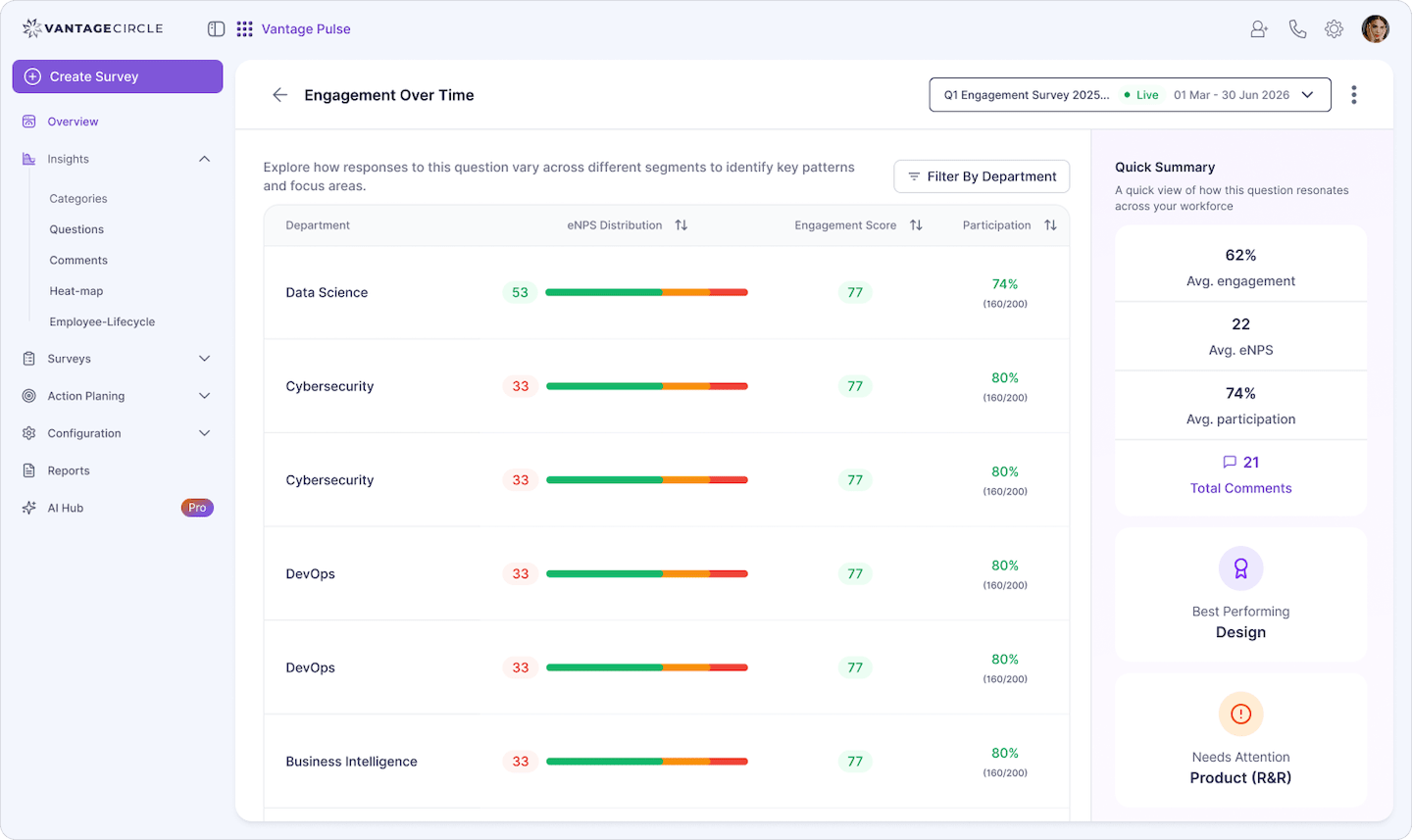
Picture a monthly report saying 200 recognitions went out. Almost useless on its own. Now picture learning that most of them went to one department and the night shift got none. A manager can act on that by Friday. It's the whole idea behind Recognition Analytics in Vantage Rewards.
Source: Vantage Pulse
If you're more curious about how technology has evolved in the workplace, our companion guide covers the history and the adoption questions in depth.
The Overlooked Category: Employee Experience and Recognition Technology
Employee experience and recognition technology is software built to shape how people feel about their work, and it belongs on any serious list of workplace technology. It includes recognition platforms, pulse surveys, perks marketplaces, and wellbeing apps.
I've argued with colleagues about whether this belongs in a technology article at all. Isn't recognition a culture problem? Partly, yes. Collaboration is a culture problem too, and nobody leaves team chat off these lists.
The people data backs this up. When McKinsey surveyed workers who had recently quit, 35% named uncaring and uninspiring leaders among their top three reasons for leaving (McKinsey, 2022). A video-conferencing license won't fix that. A manager with forty people across four time zones still needs some practical way to notice good work and say so where others can see it.
Josh Bersin made a related case that same year, arguing that employee experience systems had become the real center of the HR technology stack. His firm's research also found the most successful HR tech projects started from employee needs and chose the software afterward (The Josh Bersin Company, 2022).
None of the ten top-ranking articles on "workplace technology" list employee-experience or recognition software as a category of its own. Every source cited in the current AI Overview sells IT services, desk booking, visitor management, or office space.
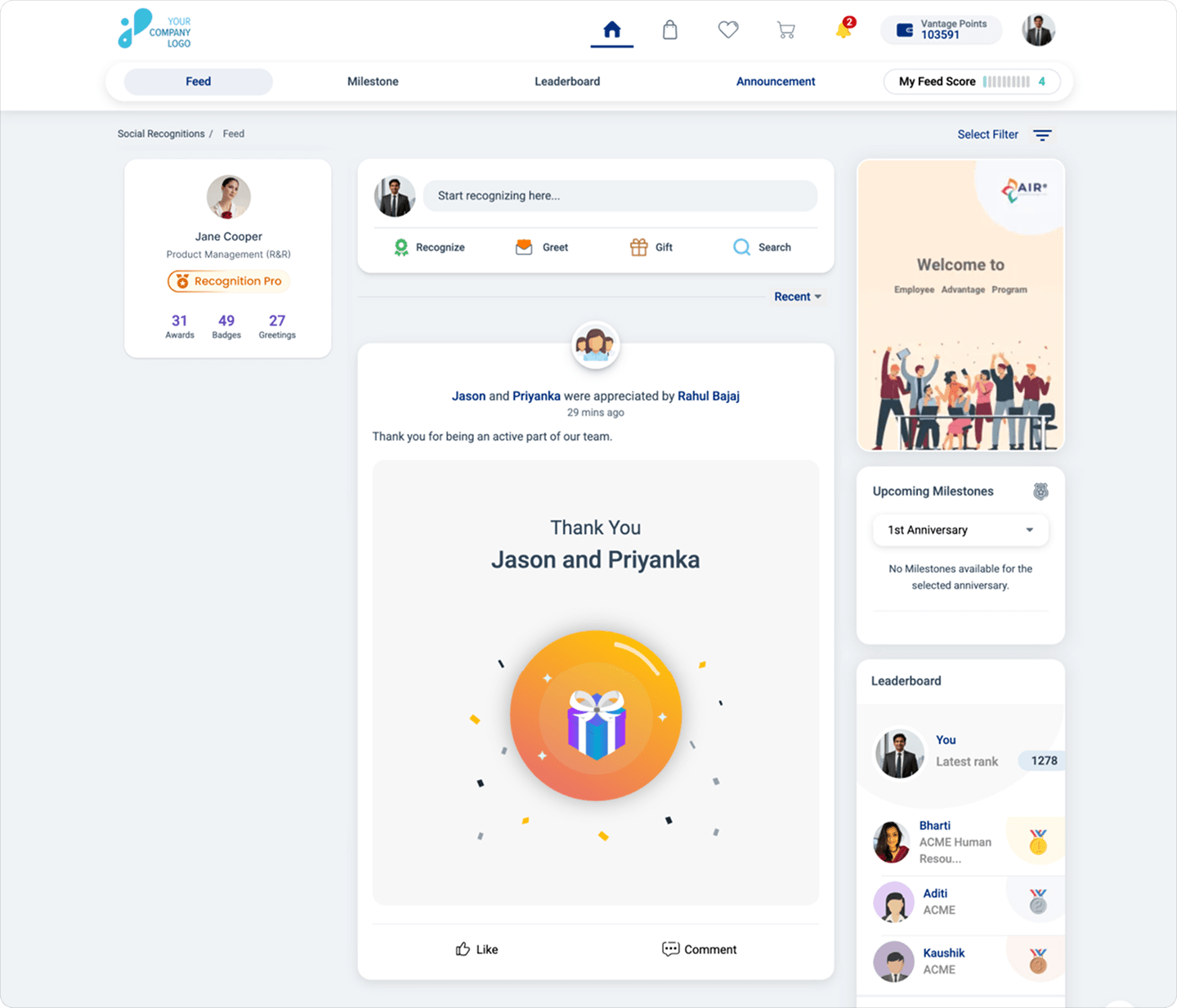
Inside one real product, the category looks like this. In Vantage Rewards, a social recognition feed shows peer and manager appreciation company-wide the moment it's posted. An engineer who stayed up to fix a 2 a.m. outage gets a shout-out tagged to a core value, and the whole company can see it by breakfast. Peer-to-peer recognition means it doesn't wait for a manager to remember.
Source: Vantage Rewards
Vantage Pulse sits beside it. It runs short eNPS surveys and reads open-text answers for sentiment trends by team, so HR finds out a department is souring before the resignation letters start. It's the same data-driven decision-making that BI tools get credit for, pointed at how people feel about their work week.
A few smaller features do quiet but useful work here. Leaderboards make contribution visible across a distributed team without anyone having to send a status email. Campaign management lets HR run a focused recognition push around a product launch or a tough quarter-end. And mobile app access is what carries all of it to frontline and field staff, who in my experience are the people most often left out of workplace technology rollouts entirely. A recognition program that only works at a desk quietly skips half the workforce in manufacturing, retail, or logistics.
For a wider look at the platforms in this space, see our roundup of employee experience software.
Does Workplace Technology Have Downsides?
Yes. The most consistent one is cognitive load, and it climbs as the tool count climbs.
A systematic review of 21 studies in Frontiers in Psychology found that working alongside automated systems tends to raise complexity and mental effort. Digital communication tools add autonomy, but they bring more interruptions along with it (Frontiers in Psychology, 2020).
Those interruptions have been measured. Researchers writing in Harvard Business Review tracked 137 workers across three Fortune 500 companies and found they toggled between apps and websites close to 1,200 times a day.
~4 hrs/week
lost per employee just getting reoriented after switching between apps, roughly 9% of their time at work. (Harvard Business Review, 2022)
That's four hours per person, every single week, spent finding their place again.
There's a governance gap too.
Leaders and employees don't even agree on how much AI is already being used. McKinsey found C-suite leaders estimated that only 4% of employees used generative AI for at least 30% of their daily work, while 13% of employees said they already did ([McKinsey, 2025](https://www.mckinsey.com/capabilities/tech-and-ai/our-insights/superagency-in-the-workplace-empowering-people-to-unlock-ais-full-potential-at-work)). That gap is exactly where unguided, ungoverned use creeps in.
Think back to that Harvard experiment. The 19-point accuracy drop happened when people used AI on the wrong task, and unguided use is how that plays out in a real office.
The load doesn't land evenly, either. Managers tend to absorb the most tools, since they sit in the approval flow of nearly every system the team uses. When I've watched a rollout stall, the cause was almost never the software itself. It was a manager with nine logins and no time to learn a tenth.
The practical fix is unglamorous. Audit the tool count once a year and ask employees which app switch wastes the most of their day.
Workplace Technology Examples by Category
Real examples make the categories easier to budget for. The table pairs each category with a common tool and the specific problem it takes off someone's plate.
| Category | Real Example | Problem It Solves |
|---|---|---|
| Collaboration & Communication | Microsoft Teams, Google Workspace | Decisions buried in email threads |
| Automation & Data Analytics | AI writing assistants, Power BI | Manual reporting every Monday |
| Hybrid-Work Infrastructure | Cloud file storage, secure VPN access | Files stuck on one office machine |
| Workplace & Facilities Management | Desk and meeting-room booking systems | Empty floors on hybrid days |
| Employee Experience & Recognition | Vantage Rewards, Vantage Pulse, Vantage Perks, Vantage Fit | Good work going unnoticed |
Two tools in that last row deserve more than a cell. Vantage Perks gives employees discounts on everyday purchases, so it's one of the rare workplace tools people open on a Sunday.
Vantage Fit runs step and activity challenges across teams. That matters more than it sounds. Aon's Global Wellbeing Survey of more than 1,100 organizations found that improving employee wellbeing factors can lift company performance by at least 11% and by as much as 55% (Aon, 2023). I wouldn't put the top of that range in a budget deck. The low end is still worth a line item.
Conclusion
Workplace technology gets judged mostly on speed, and on that measure it usually delivers. Speed doesn't answer the question HR actually hears in exit interviews, which is whether anyone noticed the work.
All five categories earn their place. The research above suggests they earn it best when the stack stays lean and each tool has a clear job. Put recognition and listening software on the same list as your chat and analytics tools, measure it the same way, and you get a far more complete answer to what technology does for a workplace.
FAQ
Q1. What are the benefits that technology brings to employees?
A: Employees get time back on routine work, easier access to colleagues in other locations, and in many roles the option of a hybrid schedule. Recognition and wellbeing tools add one more benefit most lists miss. They make good work visible to people beyond the employee's own manager.
Q2. What are the benefits of using technology at work?
A: For the organization, the big ones are productivity and retention. Harvard and BCG researchers found AI users finished 12.2% more tasks, and Stanford's hybrid-work trial showed a one-third drop in quit rates.
Q3. What are the 5 benefits of technology?
A: In a workplace setting, the five most cited are faster output, easier collaboration, flexibility for hybrid and remote work, better data for decisions, and a stronger employee experience through recognition and feedback tools. The last one is the benefit most published lists leave out.
Q4. What are 10 advantages and disadvantages of technology?
A: On the plus side, technology speeds up routine work, improves output quality on well-suited tasks, connects distributed teams, supports hybrid schedules, and turns decisions into something you can check against data. On the minus side, it adds cognitive load, multiplies interruptions, and creates app sprawl that makes information harder to find. It also produces errors when AI is used on the wrong kind of task, and it runs into governance gaps when leaders don't know how tools are actually being used.
Q5. How do we benefit from technology?
A: Mostly through time. Tools that remove repetitive steps and cut down on searching give people hours back each week, and good recognition software makes sure the work done in those hours gets seen.

He has worked in the human resources environment and has elevated recognition and rewards through his insightful and detailed writing. He aims to enhance the practice of Recognition in the workplace with new ideas and innovation that will help shape the work culture. For any related queries, contact editor@vantagecircle.com